


Swimmetry
2.370.00 Reviews
App Specs
- Version
- 1.2.79
- Updated On
- License
- Free
- Downloads
- 10,000+
- Developer
- 10KLakes, LLC
- Categories
- Sports
- Platform
- Android
Screenshots
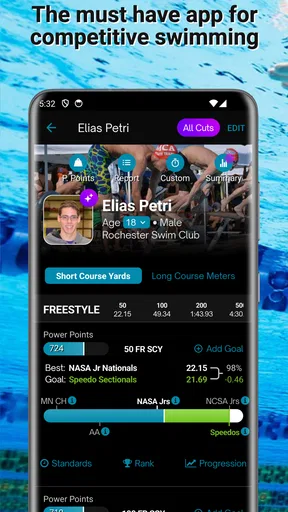
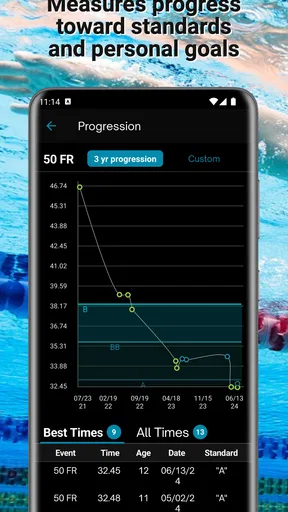
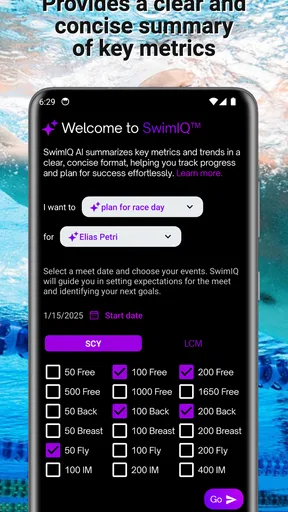
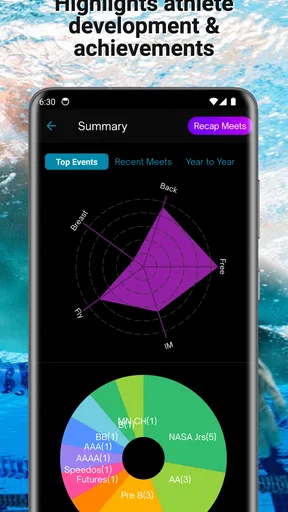
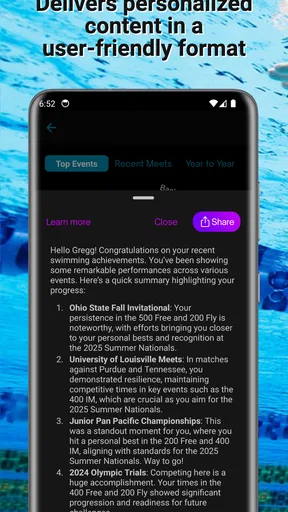
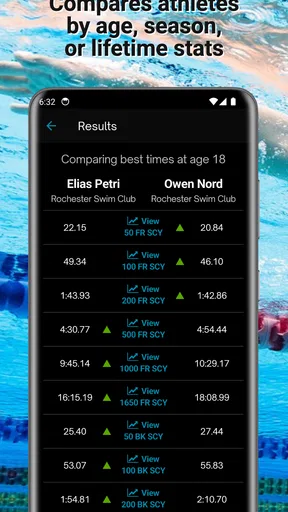
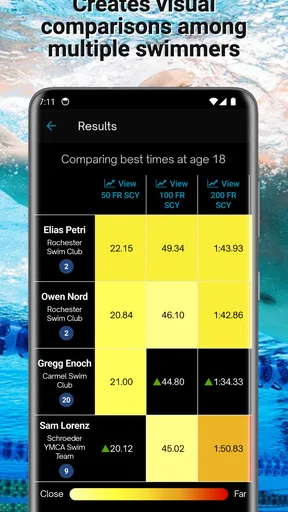
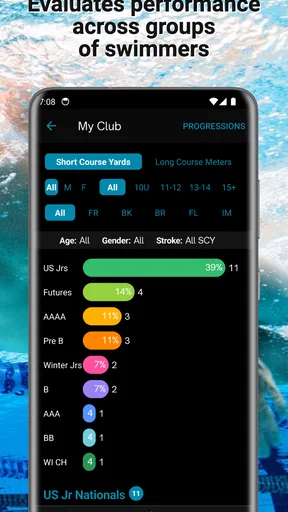
 Analysis by AppCompare
Swimmetry is a sports app for swimmers who want to turn everyday pool work into something easier to follow. I approached it as a practical training companion rather than a replacement for a coach: the useful question is whether it helps me understand progress, keep goals visible, and compare results without creating extra work after every session. Its focus is swimming progressions, goal tracking, comparisons, rankings, and swimming news, which gives it a broader role than a simple stopwatch.
The app is free to download, rated for Everyone, and developed by 10KLakes, LLC. It has passed the ten-thousand-install mark, although its average rating sits at 2.3 from roughly ninety ratings and about seventy written reviews. That mixed reception matters. I would not install it expecting a polished, universally loved training platform. I would install it when I specifically wanted a swimming-centered place to organize goals and look at performance in a more structured way.
From a loose swimming goal to a usable routine
I frame this section around the practical step from wanting to swim better to choosing one manageable target, because that decision shapes whether progress tracking feels useful or like extra admin. I also look at how a swimmer can keep comparisons in perspective and make the app part of a routine without letting it take over the workout.
Starting with the swimmer’s real problem
Most swimmers do not begin with a perfect training plan. I might know that I want to improve a stroke, prepare for a meet, return to the pool after a break, or simply stop feeling that every session blends into the next one. The first strength of this concept is that it starts with progress rather than isolated activity. A single time can be encouraging, but a progression gives that time context.
That distinction is important for casual swimmers. If I swim once or twice a week, I may not need an advanced analytics system filled with charts. I need a clear sense of what I am working toward and whether my recent effort is moving in the right direction. Swimmetry’s combination of progressions and goals is aimed at that middle ground: more organized than writing a result in a notebook, but less intimidating than managing a full coaching platform.
I also see a useful role for parents, developing swimmers, and small training groups. A swimmer can use the app as a personal reference, while a coach or family member can discuss the goals outside the pool. That does not mean the app replaces coaching judgment. It means the conversation can begin with something more concrete than “I think I am getting better.”
Building a session around a goal
The most sensible workflow is to decide what I want to improve before opening the app after a swim. For example, I might choose consistency in a stroke, progress toward a target, or a comparison with earlier efforts. This simple habit prevents the app from becoming another place where I merely collect information. The goal should determine what I pay attention to afterward.
Worth Reading Before You Choose

Switching to Android Auto Means Rethinking Your Driving Routine

Google Calendar Makes a Crowded Week Easier to Manage

Baby Panda World Brings Quick Play to Modern Phones, but Its Game Library Feels Busy

ESPN’s Live Game View Makes Following Close Games Easier

QuizzLand Review: A Good Fit for Short Trivia Breaks, Not Every Player

Basketball Stars: Multiplayer Is Fast, but Can It Recover When Matches Go Wrong?
A practical routine would be to check the relevant progression before training, complete the pool session normally, then return to the app while the details are still fresh. I would record or review the result, compare it with the earlier reference point, and use the ranking or news areas separately rather than letting them distract from the main goal. This order keeps the personal training task ahead of the social or informational features.
One non-obvious advantage of that approach is that comparisons become more useful when they answer a specific question. Instead of asking whether I am “good,” I can ask whether my current work supports the goal I chose. Rankings can be motivating, but they can also flatten important differences in age, experience, technique, and training conditions. I would treat them as context, not as the final verdict on my swimming.
A realistic poolside example
Imagine I swim before work several mornings in a week. I leave the pool tired and usually remember only whether the session felt easy or difficult. With Swimmetry, I would make the evening review part of the routine: open the app, check the progression connected to my focus, and look at the comparison that best reflects that effort. If I see a small improvement, I have a reason to continue. If the result is flat, I can decide whether the issue was technique, fatigue, or simply an unrealistic goal.
The value here is not that the app magically interprets every cause. It is that it gives me a repeatable point at which to think about the session. That is particularly helpful for swimmers who are motivated by visible progress but do not want to maintain a detailed spreadsheet. The app can act as the bridge between getting in the water and understanding why the next session should be different.
Keeping comparisons in their proper place
Comparisons are potentially one of the most useful parts of the experience, but they require discipline. A result from a rested swimmer in a familiar pool should not be treated as directly equivalent to a result from a tired swimmer in different conditions. I would use comparisons to spot direction and consistency, not to make a sweeping judgment from one entry.
This is also where the app may suit competitive swimmers differently from recreational ones. A competitive swimmer may enjoy seeing how a result sits beside other performances, while a beginner may find rankings discouraging if the context is unclear. For a beginner, I would start with personal progression and goals, then introduce rankings only when they feel motivating rather than stressful.
The most useful habit is to use the app as a reflection tool, not as a substitute for technique feedback. No ranking can tell me whether my breathing pattern is causing wasted movement, and no goal screen can replace a coach watching a turn. Swimmetry is strongest when it organizes the questions I bring to training; it is weaker when I expect it to answer every technical question on its own.
Where the handoffs happen
A swimming app rarely lives entirely inside the pool. The first handoff is from the swimmer to the app: I need to bring a meaningful goal or result into the system. The second is from the app back to real training: the information only matters if it changes what I do at the next session. A third handoff can happen between swimmer and coach, parent, or teammate when the progress becomes a starting point for discussion.
These handoffs are also where friction appears. If entering or reviewing a result feels like a chore, I may stop doing it consistently. If the app presents a comparison without enough context, I may draw the wrong conclusion. If a news item pulls my attention away from the personal goal, the app becomes more of a browsing destination than a training aid.
For that reason, I would establish a narrow workflow at first. I would use one progression, one main goal, and a simple review after each relevant session. Only after that routine feels natural would I spend time with comparisons, rankings, or news. This is a better test of the app than opening every section at once, because it reveals whether the core experience helps with the problem I actually have.
Using the news without losing focus
The news element gives the app a wider sports identity. It can make the experience feel connected to swimming beyond my own results, which is useful when I want motivation or a broader sense of what is happening in the sport. I would treat it as a short optional visit rather than the main reason to open the app.
That separation matters because information and training serve different purposes. News can inspire me, but it does not automatically improve my next length. A good personal rule would be to check the goal and progression first, then browse news only if I have finished the practical review. This keeps the app from turning into a feed that I consume without applying anything to my swimming.
What the current package means in daily use
The app is currently on version 1.2.79 and supports Android 7.0 or later. That relatively broad operating-system requirement makes it approachable for people who keep an older Android phone as their poolside device. I would still make sure the phone runs smoothly before relying on it as part of a regular routine, because an older handset can make any data-entry task feel slower than it needs to be.
There is no purchase required to start, but optional in-app items range from $1.99 to $12.99 each. I would begin with the free experience and only consider spending money after deciding whether the core workflow fits my habits. The key question is not whether an extra item sounds useful in isolation; it is whether it removes a real obstacle in my swimming routine. If I am not using the basic goal and progression features regularly, paying for additions is unlikely to solve the underlying problem.
Who will get the most from it
Swimmetry makes the most sense for swimmers who want structure without building their own tracking system. It is a reasonable fit for someone returning to swimming, a recreational swimmer who has started setting personal targets, or a developing athlete who enjoys seeing progress and comparisons in one sports-focused app. It may also help a parent or training partner support a swimmer’s routine without turning every session into a formal evaluation.
I would be more cautious about recommending it as the only tool for a serious competitive program. A swimmer who needs highly detailed workout planning, advanced sensor data, extensive device integration, or deep coach collaboration may be better served by a specialized training platform or direct coaching arrangement. The app’s appeal is its focused swimming framework, not an all-purpose performance laboratory.
It is also not the best choice for someone who dislikes recording anything after exercise. The concept depends on a small amount of user involvement. If I want an automatic experience that gathers everything without deliberate review, a wearable-centered alternative may feel more convenient. On the other hand, automatic collection can produce a lot of information without helping me decide what to improve. Swimmetry’s more intentional approach is a trade-off rather than an automatic advantage.
Where the flow breaks
The low average rating is a warning to take seriously. It suggests that the experience has not worked smoothly for everyone, even though the app has attracted more than ten thousand installs. I would therefore avoid making it the only record of an important training plan. Keeping a simple backup note for key goals or results is sensible, especially during the first few weeks while I decide whether the app deserves a permanent place in my routine.
Another possible break is motivational. Rankings can encourage me to return, but they can also shift attention from personal improvement to other swimmers. If I find myself checking position more often than checking my own progression, I would scale that feature back. The best measure for a returning swimmer may be consistency, while the best measure for a competitive swimmer may be a carefully chosen performance target. The app cannot choose that priority for me.
There is also a risk of mistaking organization for coaching. A clean goal workflow can make training feel more purposeful, but it cannot inspect my form or understand every reason a result changed. I would use a coach, instructor, or knowledgeable training partner whenever technique, injury prevention, or race preparation becomes central. Swimmetry can support that relationship by keeping goals visible, but it should not replace it.
My final assessment after following the workflow
I like the idea behind Swimmetry because it addresses a real gap between casual swimming and formal training. It gives a swimmer a way to move from a vague intention to a progression, from a progression to a goal, and from a goal to a review after the session. The inclusion of comparisons, rankings, and news adds motivation and context, provided I keep those features secondary to my own training purpose.
My recommendation is therefore selective. If you want a swimming-specific app that encourages you to think about progress and you are willing to take a small active role in reviewing your sessions, it is worth trying at no upfront cost. Start narrowly, test whether the goal-to-session-to-review loop becomes useful, and keep your expectations realistic about coaching and automation.
If you need advanced analysis, automatic tracking, or a consistently polished experience, I would compare it with a dedicated wearable platform, a structured coaching service, or a simple training log before committing. For me, the deciding factor is not the number of sections in the app; it is whether opening it changes what I do in the pool. Swimmetry is most valuable when it turns swimming progress into a repeatable conversation with myself, rather than another screen to check.
Pros
- Clear swim tracking helps monitor pace
- distance
- and workout progress.
- Training data is presented in a useful format for reviewing past sessions.
- Suitable for swimmers who want more structure in their pool workouts.
- Can help identify performance trends over time with regular use.
- The focused design keeps attention on swimming rather than unrelated features.
Cons
- Some features may require compatible smartwatch or sensor hardware.
- Accurate tracking can depend on correct pool length and device settings.
- Advanced metrics may take time for beginners to understand.
- Battery use may increase during longer workouts with continuous tracking.
- The app may feel too specialized for casual swimmers seeking simple logging.
FAQs for Swimmetry
What is Swimmetry, and who is it designed for?
Swimmetry is a swimming-focused app designed to help swimmers review and improve their training. It can be useful for recreational swimmers, fitness users, triathletes, and more serious athletes who want a clearer view of their sessions. Before downloading, check whether its tracking and analysis features match your swimming style, pool setup, and personal training goals.
How does Swimmetry track swimming workouts?
Swimmetry uses compatible device sensors and swimming data to record information such as laps, distance, stroke type, pace, intervals, and workout duration, depending on the device and setup. Tracking accuracy may vary with watch placement, pool length settings, swimming technique, and the type of session. Reviewing the supported devices and required permissions before installation is recommended.
Do I need a smartwatch or additional hardware to use Swimmetry?
The features available in Swimmetry may depend on whether you use it with a compatible smartwatch or another supported tracking device. Some functions can be available directly through the phone, while detailed swim metrics generally require wearable sensors capable of operating in the water. Confirm compatibility for your Android or iOS device and wearable before downloading to avoid limited functionality.
Is Swimmetry free to download, and are there in-app purchases?
Swimmetry’s download availability, subscription options, and premium features may differ between Android and iOS or change over time. Users should review the store listing carefully to see which tools are included at no cost and which require payment. Also check trial terms, renewal conditions, and whether advanced analysis, training features, or historical data require a subscription.
Can Swimmetry help me improve my swimming technique and performance?
Swimmetry can make training easier to understand by organizing workout data and highlighting patterns in distance, pace, stroke performance, and consistency. However, the app should be treated as a training aid rather than a replacement for a qualified coach. Its recommendations are only as useful as the recorded data, so swimmers should combine the statistics with personal goals, proper technique feedback, and safe training habits.


